> ## Documentation Index
> Fetch the complete documentation index at: https://docs.purna.ai/llms.txt
> Use this file to discover all available pages before exploring further.
# Paper Writer
> Create, refine, cite, and export scientific manuscripts in Purna.
Paper Writer is Purna's workspace for creating and refining scientific manuscripts. Start from a template, import an existing Word document, or continue from a completed [Deep Research](/chat-experiences/deep-research) review. You can write with AI, manage citations, review earlier versions, and export the finished document.
## When to use Paper Writer
Use Paper Writer when you need to:
* Draft a scientific article, literature review, methods paper, or research summary
* Turn research findings into a structured manuscript
* Improve the clarity, organization, or scientific tone of an existing draft
* Add and inspect source-linked citations
* Prepare a document for review, collaboration, or submission
For a quick question that does not require a document, use [Chat](/guides/chat) instead.
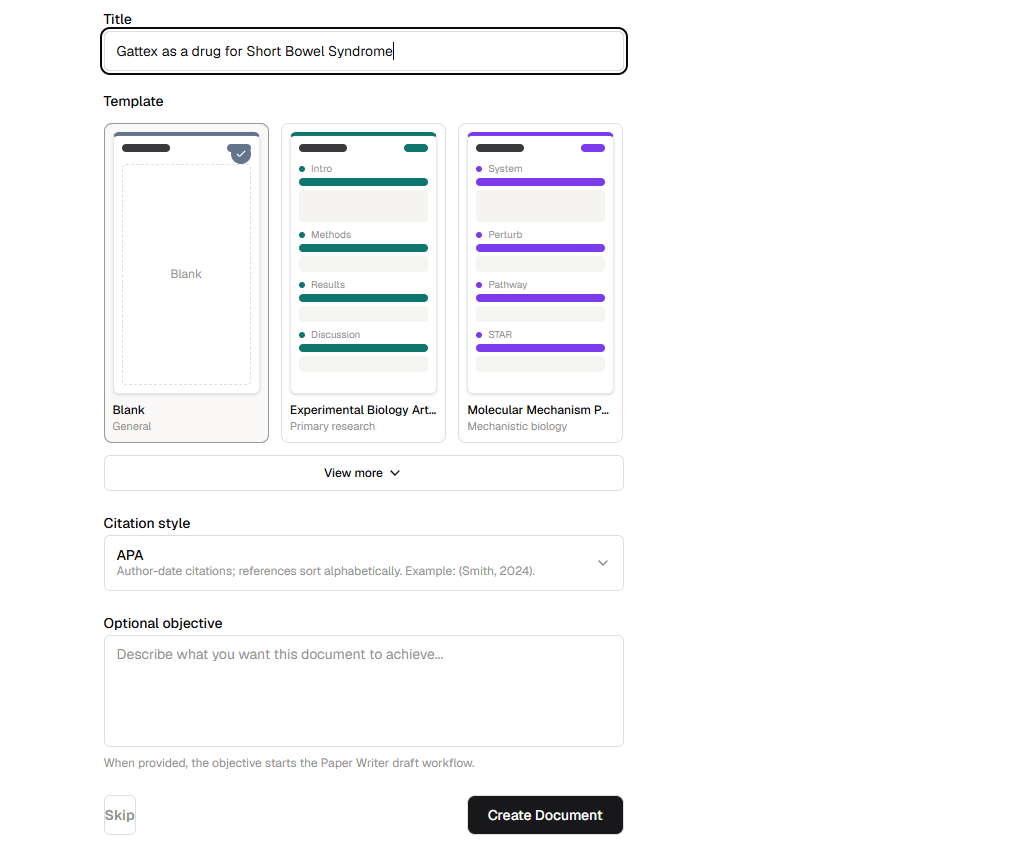
## Create a paper
1. Select **Write Paper** in the Purna sidebar.
2. Enter a title for the document.
3. Choose a template or select **Blank**.
4. Select a citation style.
5. Optionally describe what you want the document to achieve.
6. Select **Create Document**.
Templates provide a starting structure for common scientific documents. Available options include experimental biology articles, molecular mechanism papers, genomics analyses, systematic reviews, clinical trials, and observational studies.
Add an objective when you want Paper Writer to begin drafting toward a specific outcome. Leave it empty when you want to start with the template and write manually.
## Write and format the manuscript
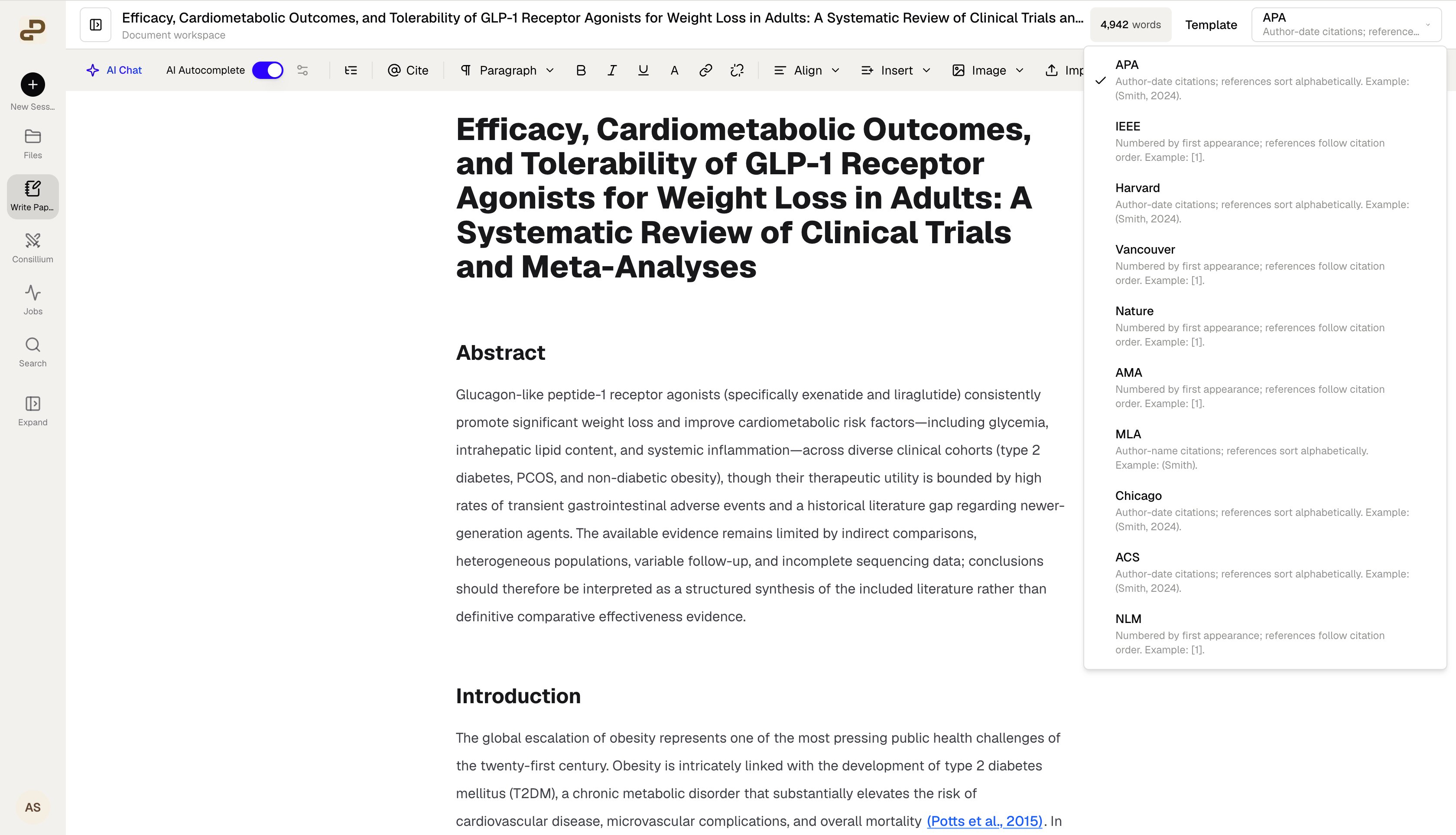
Use the editing toolbar to organize your manuscript with headings, paragraphs, lists, links, tables, equations, images, and other document elements. Your word count updates as the document changes.
Choose a citation style from the menu in the upper-right corner. Paper Writer formats in-text citations and the reference list for the selected style. Available styles include APA, IEEE, Harvard, Vancouver, Nature, AMA, MLA, Chicago, ACS, and NLM.
## Write with AI
Paper Writer includes two AI-assisted writing experiences:
* [AI Chat](/guides/paper-writer-ai-chat) helps you research questions, revise the manuscript, add sections, insert citations, and generate supporting figures.
* [AI Autocomplete](/guides/paper-writer-ai-autocomplete) suggests evidence-aware continuations while you write and lets you accept, reject, or refine each suggestion.
Both experiences use the current document as context. You remain in control of what is added to the manuscript.
## Work with citations
Use **Cite** to add a reference while writing. In-text citations remain linked to their source records, where available. Select a citation in the document to inspect details such as its title, authors, journal, publication year, DOI, or PMID.
Always open and review important sources before relying on them in a manuscript. A linked citation helps preserve provenance, but it does not replace scientific judgment or source verification.
## Import, preview, and export
Use **Import** to bring an existing Word document into Paper Writer. Before exporting, select **Preview** to inspect the document's page layout.
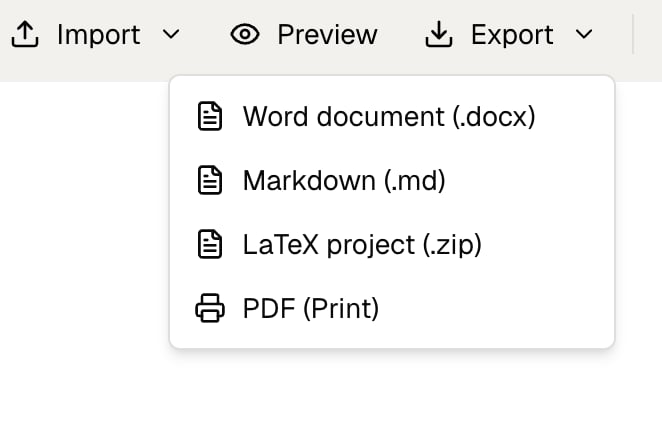
Open **Export** to choose an output format:
* **Word document (.docx)** for continued editing in a word processor
* **Markdown (.md)** for a portable plain-text document
* **LaTeX project (.zip)** for a manuscript source package
* **PDF (Print)** to open the printable version and save it as a PDF through your browser
## Restore an earlier version
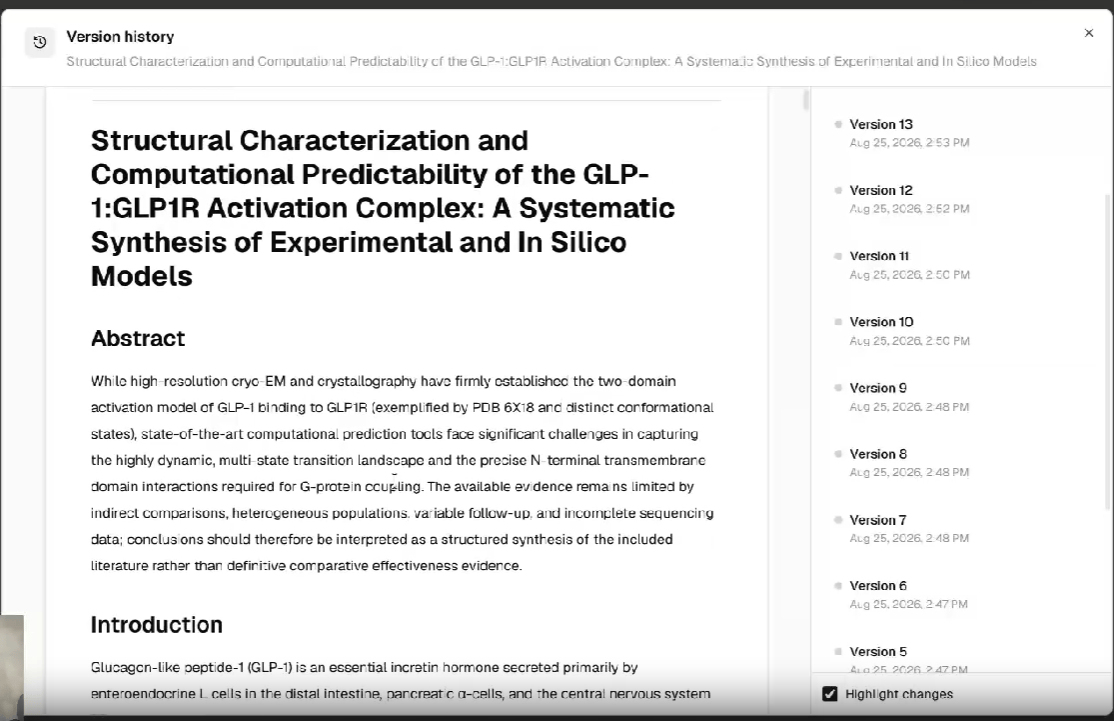
Paper Writer saves document versions as you work. Open **Version history** to inspect an earlier draft, compare it with the current document, or restore it.
1. Open **Version history** from the document toolbar.
2. Select a version from the list.
3. Enable **Highlight changes** to see what changed.
4. Review the selected draft before restoring it.
## Continue from Deep Research
When a [Deep Research](/chat-experiences/deep-research) run finishes, Purna can prepare its evidence synthesis as an editable manuscript in Paper Writer. Review the study-selection information, citations, evidence summaries, and limitations before revising or exporting the draft.
Paper Writer helps prepare scientific manuscripts, but it does not guarantee publication readiness. Verify claims, numerical results, citations, methods, reporting requirements, and journal instructions before submission.
## Watch the Paper Writer demo
See how to create, refine, cite, and export a scientific manuscript in Paper Writer.
 Templates provide a starting structure for common scientific documents. Available options include experimental biology articles, molecular mechanism papers, genomics analyses, systematic reviews, clinical trials, and observational studies.
 ## Write with AI
Paper Writer includes two AI-assisted writing experiences:
* [AI Chat](/guides/paper-writer-ai-chat) helps you research questions, revise the manuscript, add sections, insert citations, and generate supporting figures.
* [AI Autocomplete](/guides/paper-writer-ai-autocomplete) suggests evidence-aware continuations while you write and lets you accept, reject, or refine each suggestion.
Both experiences use the current document as context. You remain in control of what is added to the manuscript.
## Work with citations
Use **Cite** to add a reference while writing. In-text citations remain linked to their source records, where available. Select a citation in the document to inspect details such as its title, authors, journal, publication year, DOI, or PMID.
Always open and review important sources before relying on them in a manuscript. A linked citation helps preserve provenance, but it does not replace scientific judgment or source verification.
## Import, preview, and export
Use **Import** to bring an existing Word document into Paper Writer. Before exporting, select **Preview** to inspect the document's page layout.
Open **Export** to choose an output format:
* **Word document (.docx)** for continued editing in a word processor
* **Markdown (.md)** for a portable plain-text document
* **LaTeX project (.zip)** for a manuscript source package
* **PDF (Print)** to open the printable version and save it as a PDF through your browser
## Write with AI
Paper Writer includes two AI-assisted writing experiences:
* [AI Chat](/guides/paper-writer-ai-chat) helps you research questions, revise the manuscript, add sections, insert citations, and generate supporting figures.
* [AI Autocomplete](/guides/paper-writer-ai-autocomplete) suggests evidence-aware continuations while you write and lets you accept, reject, or refine each suggestion.
Both experiences use the current document as context. You remain in control of what is added to the manuscript.
## Work with citations
Use **Cite** to add a reference while writing. In-text citations remain linked to their source records, where available. Select a citation in the document to inspect details such as its title, authors, journal, publication year, DOI, or PMID.
Always open and review important sources before relying on them in a manuscript. A linked citation helps preserve provenance, but it does not replace scientific judgment or source verification.
## Import, preview, and export
Use **Import** to bring an existing Word document into Paper Writer. Before exporting, select **Preview** to inspect the document's page layout.
Open **Export** to choose an output format:
* **Word document (.docx)** for continued editing in a word processor
* **Markdown (.md)** for a portable plain-text document
* **LaTeX project (.zip)** for a manuscript source package
* **PDF (Print)** to open the printable version and save it as a PDF through your browser
 ## Restore an earlier version
Paper Writer saves document versions as you work. Open **Version history** to inspect an earlier draft, compare it with the current document, or restore it.
1. Open **Version history** from the document toolbar.
2. Select a version from the list.
3. Enable **Highlight changes** to see what changed.
4. Review the selected draft before restoring it.
## Restore an earlier version
Paper Writer saves document versions as you work. Open **Version history** to inspect an earlier draft, compare it with the current document, or restore it.
1. Open **Version history** from the document toolbar.
2. Select a version from the list.
3. Enable **Highlight changes** to see what changed.
4. Review the selected draft before restoring it.
 ## Continue from Deep Research
When a [Deep Research](/chat-experiences/deep-research) run finishes, Purna can prepare its evidence synthesis as an editable manuscript in Paper Writer. Review the study-selection information, citations, evidence summaries, and limitations before revising or exporting the draft.
## Continue from Deep Research
When a [Deep Research](/chat-experiences/deep-research) run finishes, Purna can prepare its evidence synthesis as an editable manuscript in Paper Writer. Review the study-selection information, citations, evidence summaries, and limitations before revising or exporting the draft.